Areas of GUI
The main areas of the Syslog Viewer GUI are shown below and described in the subsequent table.
Areas of Syslog Viewer GUI
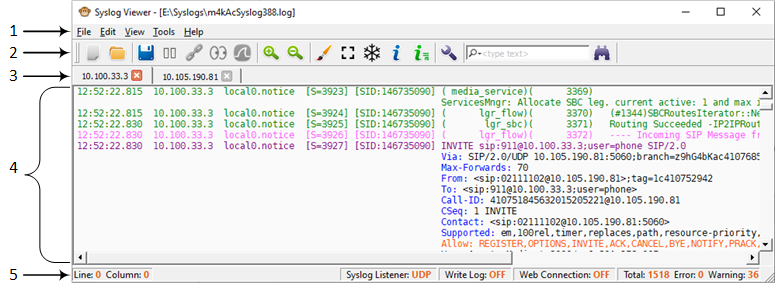
Description of GUI Areas
|
Item # |
Description |
||||||||||||||||||||||||||
|---|---|---|---|---|---|---|---|---|---|---|---|---|---|---|---|---|---|---|---|---|---|---|---|---|---|---|---|
|
1 |
Menu bar |
||||||||||||||||||||||||||
|
2 |
Toolbar with frequently required command icons:
|
||||||||||||||||||||||||||
|
Icon |
Name |
Description |
|||||||||||||||||||||||||
|
|
Clean |
Clears the syslog messages in the window. |
|||||||||||||||||||||||||
|
|
Open |
Open a syslog file saved on your computer. |
|||||||||||||||||||||||||
|
|
Write Log |
Writes (saves) syslog messages to a file. For more information, see Writing Real-time Syslog Messages to File. |
|||||||||||||||||||||||||
|
|
Stop Writing Log |
Stops writing syslog messages to a file. For more information, see Writing Real-time Syslog Messages to File. |
|||||||||||||||||||||||||
|
|
Pause |
Pauses the receipt of syslog messages from the device. For more information, see Collecting Syslog Messages Methods. |
|||||||||||||||||||||||||
|
|
Resume |
Resumes (after pausing) the receipt of syslog messages from the device. For more information, see Collecting Syslog Messages Methods. |
|||||||||||||||||||||||||
|
|
Connect To |
Connects to the device's Web interface (over HTTP/S) from where it receives syslog messages. For more information, see Collecting Syslog Messages from Device's Web Interface. |
|||||||||||||||||||||||||
|
|
Disconnect from <IP address> |
Disconnects from the device's Web interface from where it receives the syslog messages. For more information, see Collecting Syslog Messages from Device's Web Interface. |
|||||||||||||||||||||||||
|
|
File Monitor |
Starts real-time display of syslog messages written to a file that are captured by an external syslog server. For more information, see Realtime Monitoring of Syslog File by External Syslog Sever. |
|||||||||||||||||||||||||
|
|
Stop File Monitor |
Stops real-time display of syslog messages written to a file that are captured by an external syslog server. For more information, see Realtime Monitoring of Syslog File by External Syslog Sever. |
|||||||||||||||||||||||||
|
|
Network Capture (via Wireshark) |
Starts capturing syslog messages on port 514 using Wireshark. For more information, see Using Wireshark to Capture Packets for Syslog Viewer. |
|||||||||||||||||||||||||
|
|
Stop Network Capture |
Stops capturing syslog messages on port 514 using Wireshark. For more information, see Using Wireshark to Capture Packets for Syslog Viewer. |
|||||||||||||||||||||||||
|
|
Zoom In |
Zooms in to the syslog messages window. |
|||||||||||||||||||||||||
|
|
Zoom Out |
Zooms out of the syslog messages window. |
|||||||||||||||||||||||||
|
|
External Viewer |
Displays syslog messages in an external, text-based editor (e.g., Notepad). For more information, see Viewing Syslog Messages in External Text-Based Editor. |
|||||||||||||||||||||||||
|
|
Disable Auto Scroll |
Disables auto-scroll in syslog messages window. For more information, see Freezing Syslog Messages Display. |
|||||||||||||||||||||||||
|
|
Freeze Display |
Freezes current display in syslog messages window (but continues writing to file). For more information, see Freezing Syslog Messages Display. |
|||||||||||||||||||||||||
|
|
SIP Flow Diagram |
Opens the SIP Flow Diagram window, displaying a SIP flow diagram of the currently displayed syslog messages window. For more information, see Viewing SIP Flow Diagrams. |
|||||||||||||||||||||||||
|
|
SIP Flow Diagram for All Tabs |
Opens the SIP Flow Diagram window, displaying the SIP flow diagram of the currently displayed syslog messages window (tab), and listing the sessions of all the syslog messages windows (tabs). For more information, see Viewing SIP Flow Diagrams. |
|||||||||||||||||||||||||
|
|
Options |
Opens the Options dialog box for configuring various preferences. |
|||||||||||||||||||||||||
|
|
Find Next |
Searches for a string. |
|||||||||||||||||||||||||
|
|
Switch Tabs |
Switches window tabs. For more information, see Switching Window Tabs. |
|||||||||||||||||||||||||
|
3 |
Tab bar, displaying window tabs. For more information, see Window Tabs. |
||||||||||||||||||||||||||
|
4 |
Window displaying syslog messages. |
||||||||||||||||||||||||||
|
5 |
Status bar, displaying various status information:
|
||||||||||||||||||||||||||


